
Microsoft Benefit Packages: Which Renewals Matter
Rank Microsoft benefit renewals by business impact—protect designations and co-sell first, then funding, support, and credits.
Miss the wrong Microsoft renewal, and you can lose seller access, funding, or deal support in as little as 30 days.
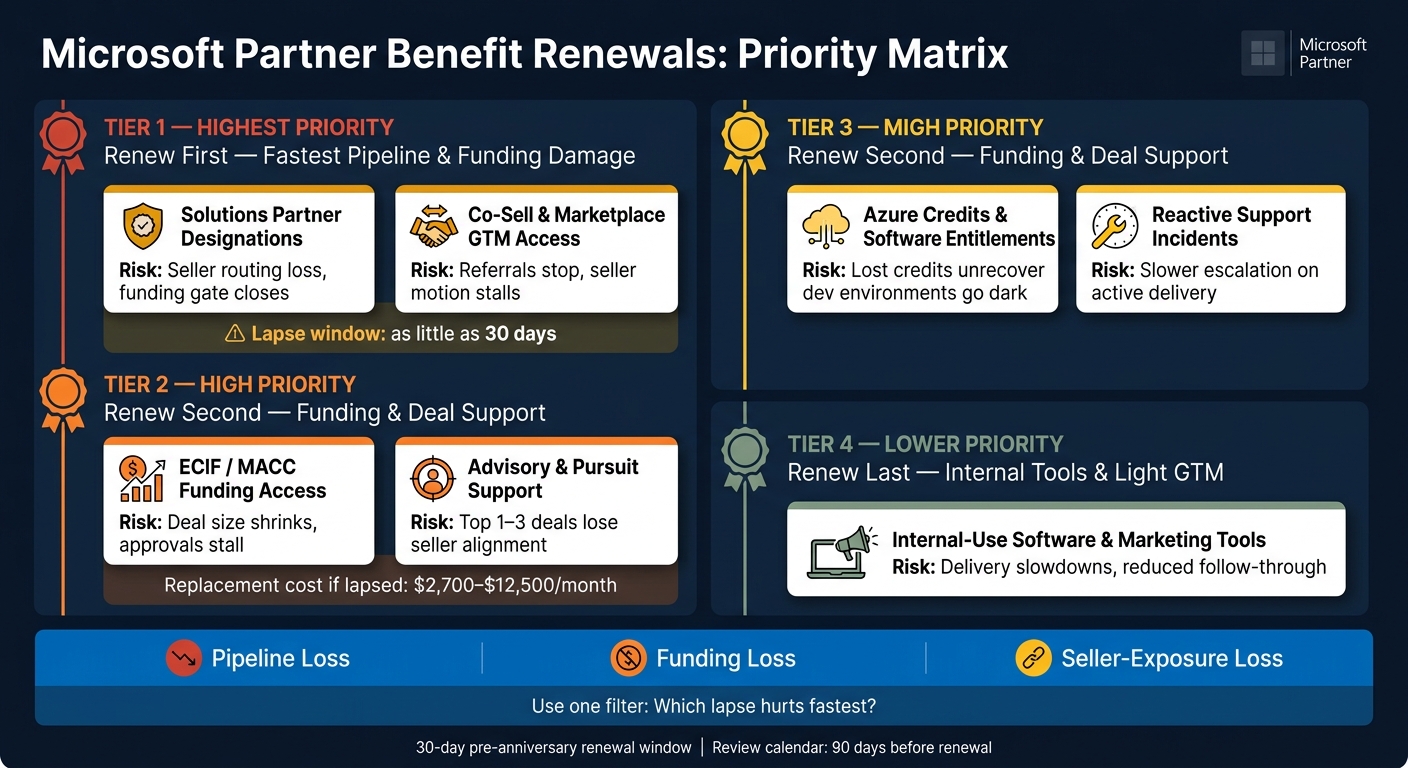
If I had to rank this article in one line, it would be this: renew designations and co-sell access first, then funding-linked partner packages, then support tied to live deals, then credits and internal-use software. That order comes down to one question: what hurts pipeline or delivery first if it expires?
Here’s the article in plain English:
- Top risk: Solutions Partner designations, co-sell status, and ECIF/MACC-linked access
- Next: Partner Launch, Core, and Expanded items tied to live deals
- Then: Advisory hours, pursuit support, and seller-facing GTM help
- Last: Internal-use software and lower-impact tools
- Time rule to watch: Microsoft uses a 30-day pre-anniversary renewal window
- Money at stake: Replacing deal support can cost about $2,700 to $12,500 per month
- Main filter: Renew the item that causes the fastest damage if it lapses
This piece covers all the main renewal groups:
- Partner Launch Benefits
- Partner Success Core Benefits
- Partner Success Expanded Benefits
- Solutions Partner Designations
- Co-Sell and Marketplace GTM Benefits
- Azure Credits and Software Entitlements
- Support and Advisory Entitlements
The FY26 Partner Designation Restructuring Is Coming - Most Partners Aren’t Ready
Quick Comparison
| Renewal area | What it protects | Risk if it lapses | Priority |
|---|---|---|---|
| Solutions Partner designations | Seller confidence, funding access, client-facing status | Loss of routing, weaker funding access, status drop | Highest |
| Co-sell and marketplace GTM | Seller-led pipeline and referrals | Fewer referrals, weaker field motion | Highest |
| ECIF/MACC-linked partner benefits | Deal funding and deal size | Smaller deals, stalled approvals | High |
| Advisory and pursuit support | Active deals and seller coordination | Slower deal movement, less deal support | High |
| Azure credits | Funding help for Azure deals | Less budget support on active deals | Medium-high |
| Internal-use software | Demos, labs, delivery environments | Delivery slowdowns and tool loss | Medium |
| Lower-impact marketing tools | Light GTM support | Lower follow-through, less sales support | Lower |
So if you’re setting your renewal plan today, I’d keep it simple: protect pipeline first, protect funding second, and protect delivery support third. Everything else comes after that.
1. Partner Launch Benefits
Partner Launch Benefits are easy to miss in the day-to-day. But if renewal slips, active selling work can get disrupted. These benefits renew month to month, and any changes or cancellation need 30 days’ notice [2].
Inside Launch, start with the benefits tied to live pipeline. Those are the ones most likely to affect deals already in motion.
Outbound Kits
Top priority: one outbound kit per quarter helps support meetings and opportunities [2].
Top 1 Pursuit Support
Top 1 Pursuit Support sits at the same top-priority level because it helps protect an active deal [2]. If you miss the renewal window, work already underway can stall.
Co-Sell Buddy Seats
The Launch tier comes with two Co-Sell Buddy seats [2][3]. Those seats help with account heatmaps, relationship mapping, and seller assignments. If your team relies on that motion, keep a close eye on them.
By comparison, the 2-day coaching SLA and monthly strategy session are lower-priority benefits. It also makes sense to review the tier 60 days before renewal and decide whether Launch still fits or if the higher tier makes more sense [2].
If your renewals are already shielding active deals, the next step is looking at whether the broader core benefits need the same level of attention.
2. Partner Success Core Benefits
Start with the renewals that protect funding, seller access, and active pursuit support.
Funding Programs - Highest renewal priority
Impact: Protects deal size and opportunity eligibility.
ECIF (End Customer Investment Funds) and MACC (Microsoft Azure Consumption Commitment) should be at the top of your renewal watchlist. These programs have a direct effect on deal size and opportunity quality [2].
Put simply, if funding access slips, pipeline quality can take a hit fast. That’s why this sits first.
After funding access, the next signal to watch is your standing with Microsoft sellers.
Solution Partner Designations - High renewal priority
Impact: Protects seller trust and client credibility.
These credentials help partners build trust with Microsoft field sellers. They aren’t something you just submit an application for. They’re earned through ongoing skilling, performance, and verified customer outcomes [4].
That matters in day-to-day selling. When sellers know your team has kept these designations in place, it can make conversations smoother and strengthen client confidence too.
Credibility helps open doors, but pursuit support is what keeps active deals from stalling.
Advisory and Support Entitlements - Medium-high renewal priority
Impact: Protects pursuit speed and complex-deal support.
If these entitlements expire, partners lose visibility to Microsoft sellers and lose support on more complex pursuits [2][4].
Review this tier 90 days before renewal. Check three things:
- Current usage
- Seller engagement
- Whether the current level still fits active pursuits
Once core GTM access is covered, compare the expanded tier to see if it adds more delivery and selling depth.
3. Partner Success Expanded Benefits
Core protects access. Expanded protects pipeline.
That’s why Expanded benefits are only worth renewing when they keep funding, seller access, and pursuit support active. If those pieces aren’t in play, the renewal starts to look a lot less attractive.
Funding Program Access (ECIF/MACC)
Renewal sensitivity: Very high. Financial value at risk: Very high.
ECIF and MACC usually sit at the top of the list for one simple reason: if you lose them, deal size can shrink fast.
This is the part that hits the numbers first. When funding goes away, there’s less budget support behind active opportunities, and that can limit what gets approved or how far a deal can go.
Once funding is locked in, the next issue is just as important: are Microsoft sellers still sending opportunities into the pipeline?
Seller Activation and Co-Sell Referrals
Renewal sensitivity: High. Pipeline impact: Primary.
Expanded renewal matters most when Microsoft sellers are actively bringing in qualified opportunities. That’s the line between a repeatable co-sell pipeline and the kind of random, occasional referrals that are hard to plan around.
If seller activity slows down, pipeline sourcing tends to slow with it. And when that happens, the value of renewal gets much harder to justify.
Technical Advisory and Pursuit Support
Renewal sensitivity: High. Operational Risk: High.
On-demand deal support and seller coaching help keep complex pursuits moving. Without that support, teams often need outside help, and that can cost $2,700 to $12,500 per month.
There’s another side to this too: unused advisory time is expensive to waste. If you’re paying for access but not using it in active pursuits, that spend can quietly slip through the cracks.
Training and Skilling Entitlements
Renewal sensitivity: Moderate. Long-term risk: Designation eligibility.
Training entitlements may not change current delivery right away. But skipping them can create problems later, especially if they affect future Solutions Partner designation eligibility.
So while the short-term hit may feel small, the long-term tradeoff can be harder to ignore.
| Benefit Category | Financial Value at Risk | Operational Risk |
|---|---|---|
| Funding Programs (ECIF/MACC) | Very high | Low operational risk; very high financial risk |
| Seller Activation / Co-Sell | High | High - pipeline sourcing stalls |
| Technical Advisory / Pursuit Support | High | Moderate - disrupts weekly operating rhythm |
| Training Entitlements | Moderate | Low - long-term designation risk |
Next, compare these renewal stakes with your Solutions Partner designations.
4. Solutions Partner Designations
Solutions Partner Designations are earned, not handed out. That means renewal risk is tied to performance, skilling, and customer outcomes, not just a date on a contract. They aren’t one-time join-and-keep credentials either. Your team needs certified skilling, and Microsoft keeps checking for verified customer outcomes on a rolling basis.[4]
That difference matters. If a package-based benefit expires, the damage usually stays limited to that one entitlement. If a designation lapses, the hit spreads much further. It can affect seller routing and program eligibility, not just access. That’s why designations sit among the most sensitive renewals in the stack.
Designation Status and Seller Alignment
Renewal sensitivity: Very high. Pipeline impact: Primary.
Microsoft sellers tend to route more attention to partners with active designations because those credentials show delivery capability and solution-area depth. Lose that signal, and things can slow down fast. Seller routing weakens, and qualified opportunities start drying up.
After that, the next thing to review is whether the designation still opens the door to the funding tied to it.
Funding Eligibility
Renewal sensitivity: Very high. Financial value at risk: Very high.
Designations often act as the gate for ECIF and MACC.[2] If the designation drops, eligibility for funding in that solution area usually goes with it. In practice, that can shrink what gets approved behind larger enterprise deals.
Delivery Credibility and Skilling Ratios
Renewal sensitivity: High. Delivery support risk: High.
Because designations rely on certified skilling across your team, a lapse doesn’t just change your Microsoft standing. It can also hint at a delivery gap to the client. That’s not a small signal. If certifications start slipping, the designation may be next, so certification tracking works well as an early warning sign for renewal risk.
| Designation Factor | Renewal Sensitivity | If Lost |
|---|---|---|
| Seller alignment and field sourcing | Very high | Seller routing slows; pipeline stalls |
| ECIF/MACC funding eligibility | Very high | Disqualified from funding for that solution area |
| Client credibility | High | Signals reduced delivery capability |
| Team skilling and certification ratios | High | Designation score drops; renewal at risk |
Next, compare these risks with co-sell and Marketplace GTM benefits.
5. Co-Sell and Marketplace GTM Benefits
Co-sell and marketplace renewals matter when they keep sellers involved and deals moving. This isn’t about whether these benefits sound good on paper. It’s about whether they still drive active seller motion.
Co-Sell Access
Renewal sensitivity: Very high. Pipeline impact: Primary.
Active co-sell status keeps Microsoft field sellers involved in your deals.[2] If that status lapses, seller routing weakens and deal flow gets uneven.
Once seller access is protected, the next thing to review is funding. You need to know whether it still helps move the same deals forward.
Funding Program Access (ECIF and MACC)
Renewal sensitivity: Very high. Financial value at risk: Very high.
Funding programs shift often, so renew them only when they still back active field-led deals.[1][5] If access drops, deal momentum can slow and close sizes can shrink.
GTM Delivery Support
Renewal sensitivity: High. Delivery support risk: High.
Outbound kits, seller-ready assets, and strategy sessions help keep co-sell motion active between meetings.[2] When this support expires or isn’t renewed, the usual problem isn’t technical. It’s weaker follow-through, stale account lists, and less movement after the call.[2]
| GTM Benefit | Renewal Sensitivity | If Lost |
|---|---|---|
| Co-sell access | Very high | Seller routing weakens; referrals become inconsistent |
| ECIF/MACC funding access | Very high | Deals lose financial leverage and can stall |
| GTM delivery support (kits, assets, strategy sessions) | High | Execution slips; follow-through weakens |
Next, compare those GTM benefits with credits and software entitlements.
6. Credits and Software Entitlements
Once GTM access is in place, the next step is to split renewals into two groups: the ones that help fund deals and the ones that mainly keep delivery moving. Credits and software entitlements sit in those two buckets. That split matters because it tells you what to watch first.
Azure Credits and Funding Motions
Renewal sensitivity: High. Financial value at risk: High. Pipeline impact: Direct.
Azure credits matter most when they connect to ECIF or MACC. In those cases, the renewal is tied straight to deal funding. That can affect deal size, close risk, and how much attention sellers give the opportunity.
Internal-Use Software Entitlements
Renewal sensitivity: Moderate. Delivery support risk: High. Pipeline impact: Indirect.
Internal-use software entitlements come after credits in priority, but they still matter when delivery work depends on them. They keep labs, demos, and delivery environments up and running. If one expires without anyone noticing, the result is usually operational disruption.
Put simply: software entitlements support delivery; credits help win deals.
| Entitlement Type | Renewal Sensitivity | Pipeline Impact | Primary Risk |
|---|---|---|---|
| Azure credits / ECIF / MACC access | High | Direct | High financial value at risk |
| Internal-use software entitlements | Moderate | Indirect | High delivery support risk |
Review these against project timelines, not seller activity.
Next, compare these entitlements with support and advisory renewals.
7. Support and Advisory Entitlements
Support renewals usually land in two camps: delivery protection and pipeline protection. This section separates those two so you can see what matters most. The main rule is simple: protect the renewals tied to live deals first.
Reactive Support Incidents
Renewal sensitivity: Moderate. Financial value at risk: Moderate. Pipeline impact: Indirect.
Reactive support covers technical escalations and response times. It should be tracked against active delivery windows, but it usually doesn’t outrank advisory or pursuit support.
So yes, reactive support matters. It just isn’t the first renewal to defend.
Advisory Hours and Strategy Sessions
Renewal sensitivity: High. Financial value at risk: High. Pipeline impact: Direct.
This is where renewal risk starts to climb. Advisory hours linked to live strategy sessions, seller meetings, and pursuit planning can affect pipeline right away. Higher-tier models put more weight on live working sessions, with support plans that range from one to three strategy sessions per month [2][3].
Steady advisory support keeps account signals current and follow-up tight. When that support drops off, teams fall back to manual tracking and uneven execution.
The bigger renewal risk sits with pursuit support, where timing can change live deals.
Escalation and Pursuit Support
Renewal sensitivity: High. Financial value at risk: High. Pipeline impact: Direct.
Pursuit support for your top 1–3 monthly deals is the most renewal-sensitive item in this group. If it lapses, high-value deals lose the support layer that helps keep Microsoft sellers aligned and engaged [2].
Use 2-day coaching for lighter support. Use same-day coaching for active deals.
| Entitlement Type | Renewal Sensitivity | Pipeline Impact | Primary Risk |
|---|---|---|---|
| Reactive support incidents | Moderate | Indirect | Delayed technical resolution during active projects |
| Advisory hours / strategy sessions | High | Direct | Loss of operating rhythm and seller engagement |
| Escalation and pursuit support | High | Direct | Reduced coordination on top 1–3 monthly deals |
“If it does not move pipeline, it should not be in the plan.” - Matt Barron, Founder, Barron Tech [2]
If Microsoft AEs are not sourcing live opportunities, put advisory and pursuit support first [2].
Pros and Cons of Prioritizing Each Renewal Category
Not every renewal needs the same level of urgency. Put the most attention on the one that fails first and causes the most damage. The matrix below helps you rank renewals based on what breaks first, not on the name of the badge or the size of the package.
Look at each category through the lens of immediate loss. That gives you a much better signal than title alone.
| Benefit Area | Pros of Renewing Early | Cons of Deprioritizing | Immediate Downside if Lapses | Use When |
|---|---|---|---|---|
| Solutions Partner Designations | Preserves seller trust and marketplace visibility | Regaining status takes renewed skilling and performance | Badge disappears; status must be rebuilt | Enterprise funding depends on designation eligibility |
| Co-Sell & Marketplace GTM | Keeps Microsoft seller engagement active | Referrals turn sporadic and outbound effort rises | Loss of active seller motion | Pipeline is thin and seller-sourced deals are the primary growth lever |
| Credits & Software Entitlements | Offsets internal cloud and software spend | Higher out-of-pocket costs | Expired credits are lost; internal licenses can deactivate | Building or testing on Azure with active dev/test environments |
| Support & Advisory Entitlements | Protects live deals and escalations | Slower responses on critical blockers | Loss of coaching and pursuit support | Active delivery is live or complex enterprise pursuits are in motion |
A simple way to think about it:
- Put co-sell and GTM near the top when pipeline is thin and seller-sourced deals drive growth.
- Put support and advisory first when delivery is live and you can’t afford delays on blockers.
- Put designations first when enterprise funding depends on keeping that status in place.
Use this ranking to match renewal effort to your current pipeline, delivery load, and funding dependence.
Conclusion
When you look across all benefit packages, renewal priority comes down to business impact. For most partners, the right order is simple: renew Solutions Partner designations and co-sell status first, then core or expanded partner benefits, then marketplace GTM offers and high-value credits, and finally software entitlements and lower-impact marketing tools.
That order comes from three risks: pipeline loss, funding loss, and seller-exposure loss. In plain English, the fastest damage happens when a lapse cuts off pipeline, funding, or access to sellers.
A good way to sort renewals is to use one filter: which lapse hurts fastest? Put the first renewals on the items that would damage pipeline, funding, support capacity, or delivery continuity the fastest.
Once the order is set, the next move is making sure dates don’t slip. Track both the partner anniversary date and the benefit expiration date in one renewal calendar, then review that calendar as part of your normal operating cadence.
The partners that protect the most value renew the highest-risk benefits first.
FAQs
How do I rank my Microsoft renewals?
Put renewals in order based on what they mean for your active pipeline and how steady your revenue stays over time. Start with GTM offers, co-sell funding, and support assets linked to seller-ready account momentum.
Barron Tech can help make tracking simpler. You can also use Co-Sell Buddy to map account heatmaps and solution coverage, so your renewal priorities stay in step with Microsoft seller priorities and your revenue base stays steadier.
What should I renew first if I have live deals?
Prioritize renewals that have a direct impact on your visibility with Microsoft sellers and your ability to keep momentum in motion. Start with the tools and support items that keep account planning active and seller engagement steady.
That way, you’re less likely to lose traction during key sales cycles. Barron Tech supports this work through GTM consulting and Co-Sell Buddy.
How far ahead should I track renewal dates?
For critical Microsoft benefit packages, start tracking renewals at least 90 days ahead. That gives you enough time to review performance, check for program changes, and fine-tune your co-sell execution strategy so nothing slips through the cracks.
For broader financial resilience, a 12-week operating rhythm can help you keep an eye on business health and spot renewals before they start affecting your pipeline.