
Microsoft Co-Sell Attribution Rules: Guide
Four rules to keep co-sell credit accurate: Partner Center as source, one owner, evidence standard, and regular audits.
If your team can’t tell who owns co-sell credit, your numbers will drift. I’d boil this guide down to four rules: use Partner Center as the record for attribution, keep CRM for sales work, assign one owner per deal, and require proof at each stage before a record counts.
Here’s the short version:
- One record: Partner Center is the source for co-sell credit.
- One owner: Sales, alliances, and admin each have a fixed job.
- One proof standard: Missing fields, weak notes, or no usage proof = no credit.
- One review cycle: Weekly pipeline checks and monthly audits stop duplicate claims, stale deals, and bad stage updates.
I’d also keep the pipeline split into three motion types from day one:
- Partner-led
- Microsoft-led
- Shared pipeline
That matters because each one has different rules for who creates the record, who updates it, what proof is needed, and who gets reporting credit.
A few points stand out fast:
- A deal should not move to Active Pursuit until Microsoft accepts it and assigns a seller.
- A Closed-Won deal needs more than a signed contract. It needs proof of consumption and a confirmed customer outcome.
- If two teams claim the same account, the fix starts with the account map, seller assignment, and record evidence.
- During a dispute, the record should stay frozen from reporting until the decision is logged.
In plain terms, this article is about keeping co-sell reporting clean enough that leadership can trust it, sellers can defend it, and funding paths like ECIF and MACC don’t get blocked by bad records.
| Area | Main rule |
|---|---|
| Record source | Partner Center for attribution |
| Sales workflow | CRM for forecasting and task work |
| Required data | Account, Microsoft contacts, coverage, status, owner |
| Proof standard | Outreach, planning notes, or consumption proof in-record |
| Review cadence | Weekly pipeline review + monthly audit |
| Dispute path | Seller → alliance lead → admin |
If I were setting this up, I’d treat every co-sell deal the same way: clear owner, clean fields, attached proof, fixed review cycle. That’s the core system the full guide lays out.
Referrals: Creating a Co-sell Deal
Governance Model: Rules, Records, and Evidence Standards
Shared pipeline attribution only works when one record, one owner, and one evidence standard govern each deal. That’s the baseline. These rules spell out who owns the record, what counts as proof, and when credit can shift.
System of Record and Required Fields
Use Partner Center as the attribution record. Use CRM for workflow and forecasting. [1][2]
Every shared opportunity record needs to stay current across these core fields:
| Field Category | What to Capture |
|---|---|
| Account Identity | Target account name, industry, and Azure-active status |
| Microsoft Field Contacts | Named Azure AE, SSP, and ATS assigned to the account |
| Coverage and Engagement | Solution area, heatmap status, and MACC/ECIF eligibility |
| Execution Status | Campaign assignment, assigned seller tasks, outreach sent date, and next follow-up step |
| Record Ownership | Partner owner, Microsoft seller owner, and last-updated date |
If even one required field is missing, don’t count the record.
Attribution Models: Partner-Led, Microsoft-Led, and Shared Pipeline
Each attribution model follows its own rules for record creation, updates, and proof. If the model is unclear at the start, reporting gets messy fast.
| Attribution Model | Record Creator | Status Updates | Evidence Required | Reporting Credit |
|---|---|---|---|---|
| Partner-Led | Partner (Partner Center) | Partner updates the record and drives next steps | Customer interest evidence or Azure usage proof | Partner-sourced credit |
| Microsoft-Led | Microsoft seller; record must reflect Microsoft initiation from the start | Partner accepts and updates the record | Partner value-add or signed SOW | Microsoft-initiated referral credited to Microsoft |
| Shared Pipeline | Joint or collaborative | Shared ownership | Joint account planning notes or meeting records | Shared credit or influence credit |
Data Hygiene and Audit Rules
Once the record model is set, the work shifts to keeping it clean. Weekly cleanup and monthly audits make attribution easier to defend.
Link every record to a named Microsoft seller. Keep account heatmaps, outreach drafts, and seller tasks in the same record so the full history lives in one place. Run weekly pipeline reviews, then use a monthly audit to catch duplicate records, stale deals, and missing seller linkage.
Evidence needs to be easy to verify before any dispute starts. That means documenting documented outreach, customer-ready assets, or proof of consumption in the record itself. [1][2]
Attribution Rules by Pipeline Stage
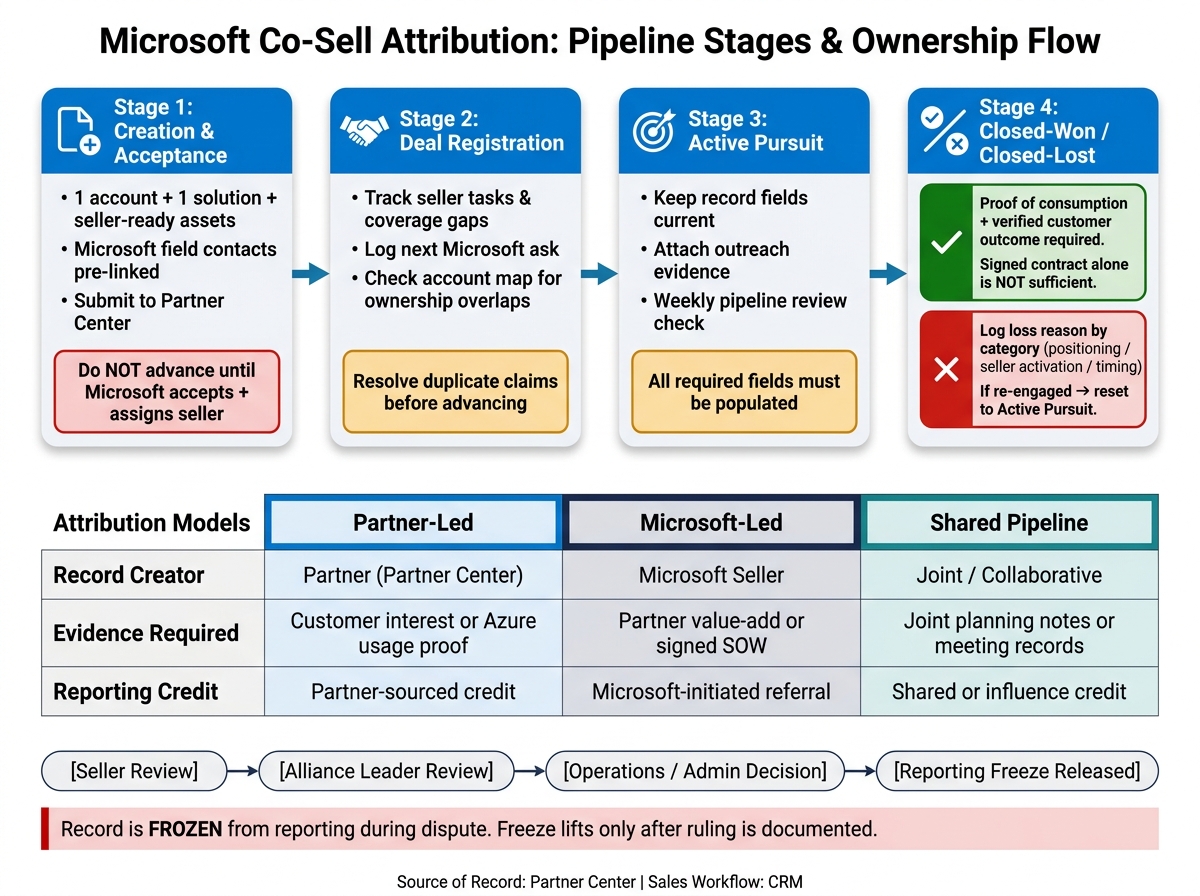 Use attribution rules at each point in the pipeline: creation, acceptance, pursuit, and close. The governance rules above apply at every stage listed here.
Creation and Acceptance
At the start, keep the offer tight: one account, one solution, and seller-ready assets before submission. Microsoft field contacts should already be tied to the account before the record is submitted [1].
Only move an opportunity to Active Pursuit after Microsoft accepts the record and assigns a seller.
Deal Registration and Active Pursuit
Once the deal is in motion, keep the record up to date. That means tracking seller tasks, coverage gaps, and the next Microsoft ask [2][4]. If that sounds simple, it is - but it matters. A stale record can create confusion fast.
To avoid duplicate credit claims, use the approved account map to sort out ownership overlaps before the deal moves ahead [1][2]. If two teams say they own the same account, check the record against the documented relationship map before moving forward.
The close stage is where active pursuit becomes reportable credit.
Closed-Won, Closed-Lost, and Reporting Outcome
Closed-Won credit needs proof of consumption and verified customer outcomes. A signed contract by itself is not enough [4][5].
For closed-lost deals, log the reason by category - such as positioning, seller activation, or timing - so leadership can spot where the pipeline is slipping [3]. If the deal comes back to life, reset it to Active Pursuit and add a new next action [2].
| Status | Reporting Outcome | Exception Handling |
|---|---|---|
| Closed-Won | Reported using proof of consumption and verified customer outcomes | Use the ship date or win date for leadership rollups [3][4][5] |
| Closed-Lost | Loss reason logged by category | If re-engaged, reset to Active Pursuit with a new next action [2][3] |
| Re-engaged Opportunity | Returns to Active Pursuit | Update positioning, mapped contacts, and the seller task list before resubmitting [1][2][4] |
These stage rules connect directly to the ownership and dispute workflow that follows.
Role Ownership, Disputes, and Correction Workflow
Use role ownership to fix disputes fast. If you don’t, records get stale and credit starts to look shaky. Clear ownership keeps a dispute from turning into a reporting error. This connects straight to the control model at the center of the article: one record, one owner, one evidence standard.
Who Owns What Across Sales, Alliances, and Operations
Each role touches the record at a different stage. When those jobs blur together, attribution starts to drift.
| Role | Primary Responsibility | Decision Rights |
|---|---|---|
| Partner Seller | Executes assigned campaign and enablement work, maintains next actions and follow-up status, and sends outreach through Teams or email | Primary owner of outreach execution and follow-up evidence |
| Alliance Leader | Maintains account visibility, maps Microsoft contacts to target accounts, identifies heatmap gaps, and leads weekly pipeline reviews | First-line dispute mediator |
| Partner Manager | Runs 1:1s, validates Microsoft field alignment, and confirms Microsoft-side attribution with Microsoft | Validates Microsoft-side attribution |
| Operations/Admin | Manages the system of record, enforces data hygiene, and controls reporting freezes | Final decision maker for freezing records in reporting |
Start with these owners before anyone escalates the issue.
How to Handle Misattribution and Rejected Records
Apply the one-record, one-owner rule before making any change.
If a record comes back rejected, or two teams claim the same deal, begin with the evidence already attached to that record. That’s the first place to look, and usually the fastest way to sort out what happened.
For duplicate credit claims, pull the approved account map and check which seller was assigned to the account before outreach began. If a record was moved to the wrong stage, verify that the right Microsoft seller contacts and coverage status were already in place before that stage change happened. If a submission gets rejected, log the rejection reason, fix the field or work item that caused the problem, and resubmit with updated evidence instead of sending the same record back unchanged.
Keep the evidence attached to the record.
Escalation Path and Decision Rights
If the seller can’t resolve the correction, move it to the alliance leader. If it’s still stuck, send it to operations/admin for the final call. The path is simple: seller review → alliance review → operations decision → reporting freeze release. During the dispute, operations freezes the record from reporting until the ruling is documented [2].
To stop disputes from dragging on, work them through weekly pipeline reviews and partner-manager 1:1s. Set a short resolution SLA so active pursuits don’t stall [1][2].
Once the ruling is documented, the record goes back into reporting.
Reporting Logic and Leadership Review
Once disputes are closed, fold the cleaned data into leadership reporting. The goal is simple: show where attribution is clean, where it starts to slip, and where leaders need to step in.
Core Metrics and Rollups for Pipeline Review
Track attribution metrics across four buckets: pipeline volume, efficiency, hygiene, and engagement.
- Pipeline volume: created opportunities, accepted opportunities, and active shared pipeline
- Efficiency: stage conversion, win rate, and average sales cycle
- Hygiene: rejected records, stale opportunities, correction volume, and heatmap gaps
- Engagement: Microsoft-sourced pipeline, campaign-to-opportunity conversion, and ECIF/MACC usage
Segment every rollup by deal type: partner-led, Microsoft-led, and shared pipeline. If you lump them together, you can’t tell which motion is driving results.
Use account heatmaps to spot coverage gaps and relationship gaps. That gives leaders a fast read on where deals have support and where they don’t.
Monthly and Quarterly Leadership Review Steps
Reporting only helps if it leads to action. Use the same data in coaching and governance reviews.
Run a monthly strategy session with sales leadership and alliance managers. Focus on pipeline hygiene, top pursuit coaching, and seller activation. Look for stale records with no next step, and audit rejected submissions to find patterns in evidence failures [4]. If the same rejection keeps showing up, treat it as a seller activation and positioning problem, not a tooling problem.
Run a quarterly governance review with executive leadership and alliances. Review win-loss trends, measure funding motion ROI, update campaign assignments, and refresh attribution policy when the same patterns show up again.
| Review Level | Frequency | Participants | Key Focus |
|---|---|---|---|
| Pipeline Call | Weekly | Sellers, Alliance Leads | Microsoft-sourced opportunities, active shared pipeline, next actions |
| Strategy Session | Monthly | Sales Leadership, Alliance Managers | Hygiene checks, deal/seller coaching, campaign execution review |
| Governance Review | Quarterly | Executive Leadership, Alliances | Attribution governance, funding motion ROI (ECIF/MACC), campaign planning |
Conclusion: The Rules That Keep Co-Sell Credit Clean
The system depends on four things working together: Partner Center as the governing record, clear role ownership across sales, alliances, and operations, routine review of heatmaps and stale opportunities, and leadership sessions that catch exceptions before they snowball.
When one of those breaks, disputes follow. When all four hold, co-sell credit stays clean and leadership sees a pipeline it can trust.
FAQs
What counts as valid proof for co-sell credit?
Valid proof goes beyond lead registration. You also need to show customer use and real engagement with Microsoft field sellers on active deals.
In plain English: it’s not enough to say a lead exists. You need records that show account coverage, contacts mapped to specific Microsoft sellers, and a steady trail of pursuit activity.
That usually includes:
- documented account coverage
- contacts tied to named Microsoft sellers
- a steady record of follow-ups and deal pursuit work
Barron Tech’s Co-Sell Buddy helps teams track this seller-backed activity.
When should a deal be frozen from reporting?
Once a deal reaches a closed status, it should be frozen from reporting. That protects data integrity and keeps pipeline measurement accurate.
Using the same reporting triggers also helps keep the full story of the deal in place as it moves from active engagement to final attribution. The result is fewer reporting mistakes and co-sell execution that stays focused on the milestones that matter right now.
How do we handle duplicate account claims?
Keep clear records of your Microsoft relationship map and coverage status for each target account.
When you need to sort out duplicates, check which partner has active, documented traction with specific Microsoft sellers. Store account context, outreach history, and Microsoft contact details in one place so you can show the depth of the relationship and where your solution fits.