
· 14 min read
Positioning Statement Guide for Microsoft Co-Sell GTM
Turn a one-line Microsoft co-sell positioning into seller-ready triggers, ECIF plans, account heatmaps, and measurable pipeline outcomes.
In this article
I start Microsoft co-sell positioning with one question: When should a seller bring my team into an account? My answer names the customer problem, the offer, one current Microsoft solution play, and an outcome I can support with measured results - or a clearly labeled target.
In this guide, I show how I turn that statement into:
- Seller action: A customer trigger, proof, and a clear next step.
- Account plans: Heatmap priorities, named owners, and follow-up dates.
- ECIF planning: Customer outcomes, delivery scope, and verified funding status - not assumed approval.
- Pipeline tracking: Qualified opportunities, stage changes, and revenue counted once per opportunity.
My rule: keep proven results separate from targets. When results aren’t available, I set a baseline and track progress at 30, 60, and 90 days. Then I use seller feedback and deal results to check whether the message works.
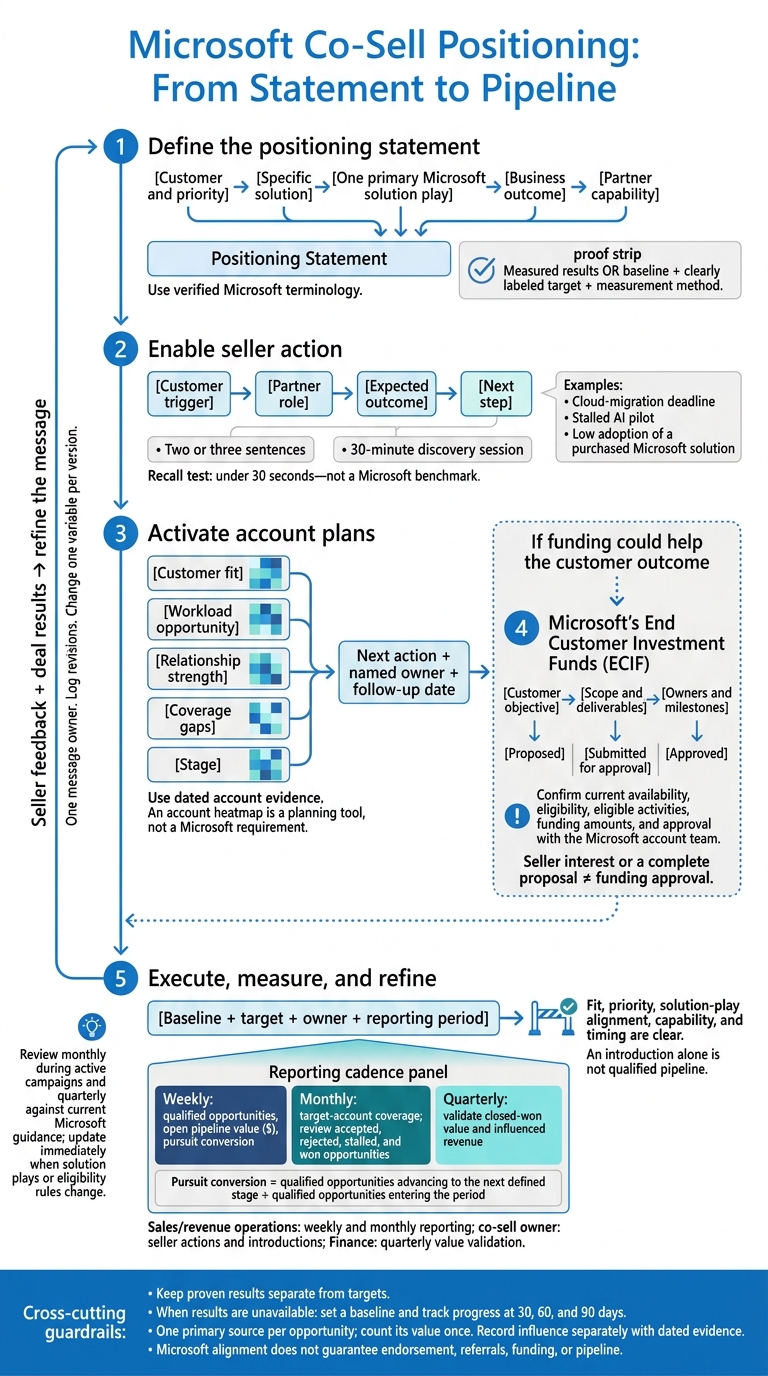
Align Your Statement With a Microsoft Solution Play
Choose a Customer Priority and Solution Play
Start with the customer problem in your positioning statement. Before choosing a Microsoft play, define the account profile, buyer role, measurable business problem, and Microsoft workload. Solution plays help focus sales actions on customer needs and outcomes.[2][3]
Choose one primary play that matches the customer’s top-priority outcome - not every capability you sell. Complete the required fields for your co-sell workflow.[3] Pick a play sellers can recall easily and use in live account conversations.
Write the Statement and Support Its Claims
With the play selected, write a seller-ready proof point, not a slogan. Use the template below. Bracketed fields are inputs to replace, not text to keep. For the solution-play field, use verified Microsoft terminology.
For [customer and priority], [partner] delivers [specific solution] aligned to [Microsoft solution play] so customers can achieve [business outcome] with [partner capability].
| Statement component | Microsoft co-sell relevance | Required evidence | Common failure |
|---|---|---|---|
| Customer and priority | Identifies the stakeholder and account condition | Account research, buyer role, and confirmed need | Targeting “any organization” |
| Specific solution | Shows what the seller can introduce | Scope, architecture, and workload mapping | Listing the entire service portfolio |
| Microsoft solution play | Helps assess fit and route the opportunity | The current play name in Partner Center and workload alignment | Invented or outdated play names |
| Business outcome | Gives the seller a reason to engage | Measured results or a baseline, target, and measurement method | Presenting a target as a proven result |
| Partner capability | Explains why your team can deliver | Relevant credentials, methodology, and customer evidence | Claiming generic expertise |
| Proof and scope | Makes the offer actionable | Supporting assets, timeline, geography, and owner | Unclear boundaries or next steps |
Keep the supporting evidence beside the statement in your seller materials. A certification supports a capability claim, but outcome claims need relevant results or an explicit measurement plan. Claims about what sets you apart need documented delivery strengths. Label unverified examples hypothetical. Microsoft requires a solution one-pager and pitch deck.[2]
Separate Microsoft Alignment From Partner Strengths
Use Microsoft terminology to show relevance. Then explain your delivery method, specialization, scope, and proof. Microsoft fit tells the seller why to engage; partner proof tells them why to involve your team.
Try the substitution test: could another partner use your statement unchanged? If so, specify your integration approach, delivery responsibilities, industry experience, or verified results. Alignment does not imply Microsoft endorsement or guarantee referrals, funding, or pipeline.
Before publication, check official Microsoft Partner Center guidance for current solution-area and play names, required opportunity fields, eligibility rules, and assets. Applicable program requirements are mandatory. Choosing one primary play and keeping internal messaging consistent remain recommended practices.[4]
How to Build a Winning Microsoft Partner Strategy
Show Microsoft Sellers When to Involve You
Once your positioning statement is set, turn it into a clear signal sellers can act on.
Name the Customer Trigger and Partner Role
Give sellers a clear trigger for bringing in your team:
A cloud-migration deadline, a stalled AI pilot, or low adoption of a purchased Microsoft solution.
Connect that trigger to the customer problem, solution play, and outcome in your positioning statement. Name the stakeholder, workload, and reason to act now. Explain what your team will do and when ownership returns to the customer or seller. Lead with the customer problem and outcome - not a referral ask.[6]
Keep your Teams or email message to two or three sentences covering the trigger, partner action, expected outcome, and next step. Suggest a 30-minute discovery session focused on the blocker, opportunity map, or delivery recommendation.
Put customer value first. Include workload or user metrics only when they support that value. Match the message to each role: priority and path for the account executive, fit and dependencies for the solution specialist, and adoption and value for the customer success manager. Confirm each person’s account goals rather than assuming they share incentives or promising Azure consumption.
Then check whether sellers can repeat the trigger and next step without reading the message.
Test Seller Recall and Check Your Proof
Share the message once. Then, without letting sellers look at it, ask them to repeat who you help, when to involve you, what you deliver, and what the first meeting produces. Use under 30 seconds as your recall test, not as a Microsoft benchmark. Record their wording. If they remember only your technology expertise, make the trigger more specific. If they can’t explain the next step, clarify the engagement.
Give sellers proof alongside the message; without it, they’ll ignore it. Keep a compact proof block beside the message with the customer result, baseline, measurement period, relevant credentials, owner, scope, and handoff. Use the same customer outcome language as your positioning statement so the evidence supports the claim. Use documented results - not proposed targets - as evidence. After delivery, report actual KPI performance so sellers can see whether the engagement delivered value.[5]
Use Positioning in Account Heatmaps and ECIF Planning
Account heatmaps and ECIF planning put positioning to work in active accounts. An account heatmap is a planning tool, not a Microsoft requirement. Use it to track customer fit, workload opportunity, relationship strength, coverage gaps, and stage. Keep the core positioning statement fixed, but adjust the emphasis and next action to fit each account.
Match Account Conditions to Messages and Actions
Back each rating with dated account evidence: the business priority, executive stakeholder, workload, seller access, and decision timing. These ratings are planning judgments. They support - not replace - Partner Center and account-team records.
Use the table to turn positioning into account-level actions.
| Account condition | Message emphasis | Seller action | Pipeline objective |
|---|---|---|---|
| Strong Microsoft relationships; low partner awareness | Connect the partner’s specific intervention and proof to the customer’s priority. | Introduce the partner to the account owner, workload specialist, or executive sponsor. Validate the account hypothesis. | Create a qualified discovery meeting and improve partner coverage. |
| Clear customer need; limited seller coverage | State the priority, workload, urgency, and partner role. | Find the right Microsoft account or specialist seller. Confirm whether the need is active, planned, or inferred. | Turn account intelligence into a named opportunity with a dated next step. |
| Workload expansion | Link the adjacent workload to a business benefit and a defined partner contribution. | Coordinate an expansion workshop, architecture review, migration assessment, or executive briefing with the relevant seller. | Increase opportunity scope, attach additional services, or advance an existing deal. |
| Active pursuit | Focus on the buying decision, blocker, deliverables, and deadline. | Agree on joint actions, owners, dates, customer messaging, and an escalation path. | Advance stage, remove a blocker, secure a decision, or close the opportunity. |
Use that same evidence to choose the next step - discovery, expansion, or funding support - and define the outcome ECIF should support.
Frame ECIF Around Customer Outcomes
When the heatmap shows that funding could help an account move forward, frame ECIF around the customer result.
ECIF means Microsoft’s End Customer Investment Funds. Confirm current availability, eligibility, eligible activities, funding amounts, and approval with the Microsoft account team. Start with the customer objective. Then spell out the motion, deliverables, seller role, milestones, and measurable outcome.
Record funding as proposed, submitted for approval, or approved. Include the source and date of any approval. Define success through deliverables and customer decisions, such as an accepted architecture or implementation plan.
Keep forecast benefits separate from measured results. Neither seller interest nor a complete proposal establishes funding approval.
Check ECIF Readiness and Assign Owners
Positioning provides the proof, scope, and outcome language for the funding motion. Before submitting or discussing funding, check the scope, owners, and proof points. The checks below support internal readiness; Microsoft’s current guidance controls the final determination.
| Requirement to confirm | Positioning evidence | Owner | Success measure |
|---|---|---|---|
| Customer objective | Written priority, urgency, executive stakeholder, and desired outcome | Partner lead and customer sponsor | Customer validates the objective and outcome measure. |
| Solution play | Link between customer need, workload, and solution play | Partner lead and Microsoft seller | Account team confirms or corrects alignment. |
| Deliverables | Defined outputs, scope boundaries, dates, and acceptance criteria | Partner delivery lead; customer approver | Customer and seller agree on expected outputs. |
| Account-team alignment | Named seller, specialist, and escalation contact | Microsoft account lead | Joint action plan has owners and dates. |
| Funding rationale | Explanation of how the activity advances the customer outcome and Microsoft priority | Partner lead and Microsoft seller | Rationale is ready for review. |
| Milestones | Activity dates, dependencies, customer decisions, and completion criteria | Partner project lead and customer owner | Both teams accept the delivery schedule. |
| Approval status | Recorded status and dated confirmation supporting any approval claim | Microsoft account-team contact | Status is verified. |
| Open assumptions | Open questions about eligibility, scope, access, timing, and commercial path | Partner lead; relevant Microsoft or customer owner | Each unresolved assumption has an owner and resolution date. |
Put Positioning to Work and Measure Pipeline Results
After ECIF planning, put the validated positioning statement to work in pipeline activities and reporting. Set a baseline, target, owner, and reporting period for account coverage, seller engagement, qualified opportunities, and stage progression.
Positioning needs to lead to specific seller actions and measurable pipeline movement. Give each account a message, follow-up owner, and due date. A partner-led opportunity can gain visibility without Microsoft taking action, so submission alone does not prove seller involvement.[1]
Tailor Messages to Pipeline Activities
Define the intended motion before writing or sending a message: target-account awareness, seller referral generation, dormant-relationship activation, active-pursuit support, or workload expansion. Keep the positioning fixed; change only the evidence and the ask.
Count an opportunity as qualified only when fit, priority, solution-play alignment, capability, and timing are clear. An introduction alone isn’t qualified pipeline.
Match each motion to the evidence sellers need to act.
| Channel | Message emphasis | Required evidence | Next action |
|---|---|---|---|
| Seller outreach | Customer priority, relevant solution play, and the partner’s role | Account signal, customer trigger, relevant capability, and one customer proof point | Confirm the account priority and assign an owner. |
| Account planning | How the partner supports the account plan and Microsoft workload objective | Account heatmap, stakeholder map, current Microsoft footprint, and desired business outcome | Add the partner to the plan and set a joint next step. |
| Opportunity submissions | Clear qualification and requested Microsoft involvement | Named account, customer problem, solution play, stage, timing, budget signal, and partner contacts | Accept, decline, or request missing information. |
| Executive introductions | Business outcome and reason for executive attention | Senior sponsor, business case, implementation risk, customer urgency, and proof of scale | Assign an executive sponsor and schedule the introduction. |
| Active pursuits | Deal-specific support, competitive context, and immediate blocker | Opportunity stage, stakeholders, decision process, commercial path, next milestone, and owner | Agree on one action and due date. |
Define Pipeline Metrics and Reporting Owners
Measure whether the message leads to qualified actions - not just impressions. Track whether the positioning statement converts the right accounts, sellers, and opportunities, rather than focusing on volume alone.
- Monthly: Report target-account coverage.
- Weekly: Report qualified opportunities, open pipeline value, and pursuit conversion.
- Quarterly: Validate closed-won value and influenced revenue.
Target-account coverage counts priority accounts with an owner, mapped seller, relevant solution play, current heatmap status, and at least one planned action. Report qualified open pipeline value in dollars ($). Calculate pursuit conversion by dividing qualified opportunities that advance to the next defined stage by qualified opportunities entering the period.
The partner sales or revenue operations owner handles monthly and weekly reporting. The co-sell owner counts distinct sellers who complete agreed actions, along with partner-accepted seller-sourced introductions. Finance validates quarterly values using a clearly defined revenue basis.
Assign one primary source per opportunity and count its value once. Use source to track origin and influence to track contribution. Record influence separately, with dated evidence.
The partner sales or revenue operations owner manages definitions and deduplication. The account owner verifies stages and next steps, while the Microsoft relationship or co-sell owner verifies seller involvement. Reconcile records with Partner Center by opportunity ID and reporting period.[7]
Review accepted, rejected, stalled, and won opportunities monthly to refine the message. Tighten targeting when referrals lack fit. Clarify the ask when sellers understand the message but don’t act. Record each message version and change one variable per version.
Barron Tech offers Microsoft GTM consulting and Co-Sell Buddy for account maps, heatmap coverage, seller ownership, and follow-up tracking.
Conclusion: Positioning Implementation Checklist
Use this checklist to approve the statement and keep it ready for sellers. Before approval, document these items in one sign-off record. Mark any item that doesn’t apply as not applicable.
The statement is complete only when it supports seller motion, account planning, funding, and reporting.
- [ ] Account fit: Named account, buying group, priority, and evidence of urgency.
- [ ] Microsoft alignment: One primary solution area and solution play, with the fit documented.
- [ ] Approved sentence and verified proof: One approved sentence backed by two or three verified proof points.
- [ ] Seller usefulness: Customer trigger, partner role, and seller action.
- [ ] Account heatmap: Evidence-based status, next action, owner, and review date.
- [ ] ECIF, if relevant: Customer outcome, scope, milestones, budget, sponsor, delivery lead, eligibility checks, and approval status.
- [ ] Execution and results: Planned pipeline activities, baseline and target metrics, reporting owner, and data source.
Assign one message owner, usually the GTM or co-sell lead, to control updates. Keep the approved statement and proof consistent across the solution one-pager, pitch deck, and Partner Center solution description.[8]
Update the statement immediately when solution plays or eligibility rules change. For each revision, log the seller feedback, win/loss evidence, or guidance change that prompted it. Review monthly during active campaigns and quarterly against current Microsoft guidance.
FAQs
How do I position an offer that spans multiple Microsoft solution plays?
Make your value proposition easy for a Microsoft seller to repeat. Instead of listing every capability, tie your offer to one primary solution area and one specific, high-priority play.
Build a one-page mapping document that connects that play to a clear customer outcome, a measurable KPI, and a defined delivery sequence. This gives sellers a direct link between your offer, their current goals, and the account conversations they’re already having.
How can I build seller trust without customer results?
Build seller trust by making the Microsoft seller’s job easier. Give sellers clear, ready-to-use materials that need no extra preparation.
Map your offer to a specific Microsoft solution area, play, and measurable customer outcome. Include a one-page pitch, draft Teams or email templates, and a delivery approach with a clearly defined scope.
Tie your proof points to KPIs and spell out the next step. Sellers should be able to act without having to piece together what your offer does for the customer.
How can I tell whether positioning is improving my co-sell pipeline?
During your weekly review, track opportunity registrations and deal progress in Partner Center. Look for faster deal velocity and higher conversion rates.
Review Microsoft seller response rates, joint meetings, and seller-initiated engagement to gauge whether your messaging connects. Also, check that pipeline growth maps to prioritized Microsoft solution areas and specific plays. These signals help show whether your value proposition matches current field priorities.