
· 8 min read
Weekly Client Project Dashboard for Side Consultants
Plan client delivery in 20 minutes: track due tasks, blockers, approvals, and weekly capacity using three saved views.
In this article
I plan client delivery around a 20-minute weekly review - not extra evenings of catch-up. My dashboard shows what’s due, what happens next, what’s blocked, and which client decisions I need.
Here’s how I keep that plan tied to the hours I have outside my full-time job:
- Organize delivery: Link each engagement to tasks, deadlines, owners, next actions, and approval requests.
- Check three views: Due Soon, Waiting on Client, and Blocked or At Risk.
- Plan for this week and next: Choose 2–3 deliverables and leave 20%–30% of available time for revisions and surprises.
- Set limits: Document scope changes, track approval delays, and agree on revised fees or dates before adding work.
- Review monthly: Use hours and delivery records to adjust client agreements and workload.
My rule: plan around available hours, not the hope of finding more. The dashboard helps me turn each commitment into a clear next step.
Project and Task Management Dashboard in Google Sheets (Part 1/2) | Google Sheets Dashboard Series
Set Up Client Projects and Delivery Tasks
Create one record per client engagement. Include the client name, engagement name, dates, status, scope, responsibilities, and linked tasks.[1][8][10] Use saved filtered views rather than duplicate tasks.[11] Keep work in separate work accounts, and give clients only the access they need for their own engagement.[3][6][7][9] Use those questions to choose the fields that shape your weekly view.
Add the Dashboard Fields
Include client and engagement name, project status, deliverable or milestone, due date, owner, next action, blocker, approval requirement, client approver, and approval due date.
Stick to one status set: Not started, In progress, Waiting on client, Blocked, Complete. Make dates easy to read:
November 20, 2026
Add estimated and actual hours only when you need to check capacity, track fixed-fee work, or monitor scope growth.[1][4][5]
| Field | What belongs here |
|---|---|
| Next action | The immediate step needed to move work forward |
| Blocker | The missing input or condition stopping progress, plus who can resolve it |
| Client approval | The specific decision or signoff needed |
| Due date | The deadline for finishing the task or milestone |
| Status | The task’s current stage - not a description of the problem |
Then split each engagement into tasks with clear finish lines and approval milestones.
Create Tasks for Deliverables and Handoffs
Create separate tasks for discovery notes, draft, client review, revisions, and final delivery. Give each task one accountable owner, a due date, status, next action, and project link. Name tasks after the finished result or decision - not the activity. Make approval a separate task that records the decision, approver, request date, deadline, and status.
Link dependencies so revisions don’t appear ready before the required client decision. If your tool doesn’t support dependencies, add a Prerequisite field with the preceding task’s name and due date. Check these links whenever scope or dates change. A delayed approval can affect every task that follows it.[2]
Build 3 Views for Weekly Delivery
Create three saved views from these fields: Due Soon, Waiting on Client, and Blocked or At Risk. Exclude completed, canceled, and archived tasks from all three. Show the client, project, task, owner, due date, next action, and blocker or approval details.
These are the only views you need for your 20-minute weekly review - a triage system that helps you balance client delivery with a full-time job.
Track Upcoming Deadlines and Client Responses
Set Due Soon to show incomplete tasks that are overdue or due within the next 7 calendar days. Use an “any of” date filter to keep overdue work visible. Sort by due date, oldest first, then by project. Keep missed commitments visible until they’re resolved, and record the reason and new commitment before changing a deadline.
Set Waiting on Client to show unresolved requests for input, decisions, and approvals, regardless of deadline. Display the request date, deliverable or decision, named client approver, reply due date, current status, action after approval, consultant follow-up owner, and next follow-up date. Save the submitted version and decision history in the task so approval applies to one deliverable.[12][13][15]
Flag Blockers and Set Project Statuses
Use these views to check deadlines, approvals, and risks without opening every task.
Set Blocked or At Risk to show any incomplete task that is blocked, overdue, awaiting approval, or at risk of exceeding agreed hours or scope. Keep Blocker Details separate from Project Status. Record the cause, delivery impact, resolution owner, requested fix, and escalation date. Blocked work stops. At-risk work continues, but needs corrective action.[14]
Apply the following labels only to the overall project. One minor blocked task shouldn’t automatically put the whole engagement At Risk.
| Project status | Trigger | Required action |
|---|---|---|
| On Track | Scope, schedule, and available hours remain within the agreed plan; no unresolved issue threatens the next milestone. | Continue delivery and maintain the next action. |
| Needs Client Input | Work depends on a specific client answer, file, decision, or approval. | Send one precise request naming the input, approver, due date, and delivery impact; set a follow-up date. |
| At Risk | A deadline, approval, dependency, scope boundary, or hours budget may be missed, but recovery is still possible. | Identify the risk owner and recovery step, then discuss schedule, scope, or fee changes with the client through escalation. |
| On Hold | Work has been deliberately paused by agreement or decision, rather than merely delayed. | Record the reason, pause date, restart condition, revised target date, and who authorizes resumption. |
Run a 20-Minute Weekly Review
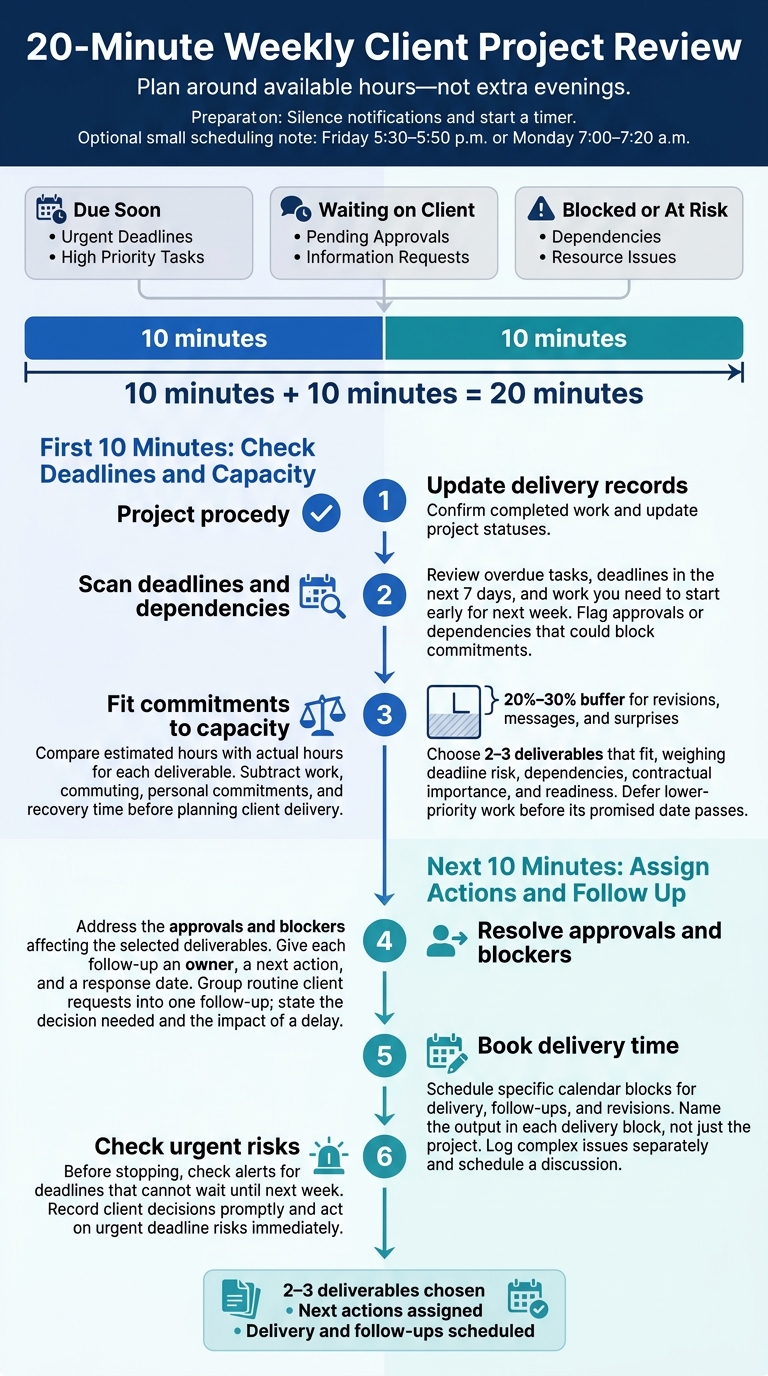 Set aside 20 minutes outside work hours - Friday 5:30–5:50 p.m. or Monday 7:00–7:20 a.m. - to review delivery using the Due Soon, Waiting on Client, and Blocked or At Risk views. Silence notifications and start a timer. Choose 2–3 deliverables you can commit to, decide what happens next on each active project, and set times for delivery and follow-ups.[16][18]
First 10 Minutes: Check Deadlines and Capacity
Confirm completed work and update project statuses. Review overdue tasks, deadlines in the next 7 days, and work you need to start early for next week. Flag approvals or dependencies that could block your commitments. Compare estimated hours with actual hours for each deliverable. Repeated overruns should change your next estimate - not take up another evening.[17]
Subtract work, commuting, personal commitments, and recovery time from your available hours before planning client delivery. Set aside 20%–30% of the remaining time for revisions, messages, and surprises. Choose 2–3 deliverables that fit, weighing deadline risk, dependencies, contractual importance, and readiness. Defer lower-priority work before its promised date passes.[18][19] Then assign the next actions.
Next 10 Minutes: Assign Actions and Follow Up
Address approvals and blockers for the deliverables you chose. Give each follow-up an owner, a next action, and a response date. Group routine client requests into one follow-up, and state both the decision needed and the impact of a delay. Book specific calendar blocks for delivery, follow-ups, and revisions. Name the output in each delivery block, not just the project.[13][20]
Log complex issues separately and schedule a discussion. Before you stop, check alerts for deadlines that can’t wait until next week. Record client decisions promptly and act on urgent deadline risks immediately.[20][21]
Conclusion: Keep Delivery Plans Current
Once the dashboard is built, keep it up to date with a short weekly review. For every active engagement, update status, next action, accountable owner, deadline, and client input needed.
Act on Scope, Hours, and Approval Delays
- Check scope: If projected hours run 10%–15% above the estimate, review the scope - not your willingness to work longer. Before starting added work, document it and its effect on fees and dates. If delivery would interfere with your full-time job, agree on a smaller deliverable or a later deadline.
- Limit revisions: Track work awaiting client acceptance separately from approved work and work over budget. Ask for signoff instead of continuing revisions without agreement.
- Escalate delays: Follow up after one missed response. After two, revise the schedule or pause work.
These records also show which clients and services should get more or less of your capacity.
Use Delivery Records for Business Decisions
Each month, review dashboard records of deadlines, approvals, hours, and follow-up delays. Look for scope creep, unpaid admin time, and work you could turn into templates or delegate. Use what you find to decide which services to standardize, which client agreements to renegotiate, and how much capacity to reserve.
FAQs
How should I prioritize conflicting client deadlines?
Tackle the tasks that pose the greatest risk to business stability first. Check your economic resilience metrics - income durability, manual-effort exposure, leverage, and optionality - for Watch or Danger zones. If several metrics are weak, start with the weakest.
Don’t cut production time to work around conflicts. When client inputs or approvals arrive late, pause delivery, move the deadline back by the length of the delay, and update the scope before work resumes. This keeps your work rhythm steady without squeezing production time.
What dashboard details should I share with clients?
Your weekly dashboard should show project status, completed work, and next week’s plan. Include upcoming milestones, risks or blockers, and key decisions made.
Track every open consultant and client action in an action log, with an owner and due date for each item. Add budget or utilization status to check that the work stays within the agreed scope. These details keep clients informed and make responsibilities and progress clear.
How do I estimate hours for unfamiliar deliverables?
Use paid discovery or a separate scope to clarify requirements before committing to the full project. Split delivery into steps, such as discovery, design, and review. Estimate the hours for each step, including prep, meetings, administration, and client handoffs. Always add a contingency buffer.
After three to five engagements, compare your estimates with the hours you actually spent. Use that data to update your templates, pricing, and timelines so future estimates are more accurate.